Thứ Năm, 16 tháng 2, 2017

Hiệu ứng Button cực đẹp
XEM BÀI VIÊT
TOÀN MÀN HÌNH


Code:


<button class="draw">draw</button>
<button class="draw meet">draw meet</button>
<button class="center">center</button>
<button class="spin">spin</button>
<button class="spin circle">spin circle</button>
<button class="spin thick">spin thick</button>


CSS:

button {
background: none;
border: 0;
box-sizing: border-box;
box-shadow: inset 0 0 0 2px #f45e61;
color: #f45e61;
font-size: inherit;
font-weight: 700;
margin: 1em;
padding: 1em 2em;
text-align: center;
text-transform: capitalize;
position: relative;
vertical-align: middle;
}
button::before, button::after {
box-sizing: border-box;
content: '';
position: absolute;
width: 100%;
height: 100%;
}

.draw {
-webkit-transition: color 0.25s;
transition: color 0.25s;
}
.draw::before, .draw::after {
border: 2px solid transparent;
width: 0;
height: 0;
}
.draw::before {
top: 0;
left: 0;
}
.draw::after {
bottom: 0;
right: 0;
}
.draw:hover {
color: #60daaa;
}
.draw:hover::before, .draw:hover::after {
width: 100%;
height: 100%;
}
.draw:hover::before {
border-top-color: #60daaa;
border-right-color: #60daaa;
-webkit-transition: width 0.25s ease-out, height 0.25s ease-out 0.25s;
transition: width 0.25s ease-out, height 0.25s ease-out 0.25s;
}
.draw:hover::after {
border-bottom-color: #60daaa;
border-left-color: #60daaa;
-webkit-transition: border-color 0s ease-out 0.5s, width 0.25s ease-out 0.5s, height 0.25s ease-out 0.75s;
transition: border-color 0s ease-out 0.5s, width 0.25s ease-out 0.5s, height 0.25s ease-out 0.75s;
}

.meet:hover {
color: #fbca67;
}
.meet::after {
top: 0;
left: 0;
}
.meet:hover::before {
border-top-color: #fbca67;
border-right-color: #fbca67;
}
.meet:hover::after {
border-bottom-color: #fbca67;
border-left-color: #fbca67;
-webkit-transition: height 0.25s ease-out, width 0.25s ease-out 0.25s;
transition: height 0.25s ease-out, width 0.25s ease-out 0.25s;
}

.center:hover {
color: #6477b9;
}
.center::before, .center::after {
top: 0;
left: 0;
height: 100%;
width: 100%;
-webkit-transform-origin: center;
-ms-transform-origin: center;
transform-origin: center;
}
.center::before {
border-top: 2px solid #6477b9;
border-bottom: 2px solid #6477b9;
-webkit-transform: scale3d(0, 1, 1);
transform: scale3d(0, 1, 1);
}
.center::after {
border-left: 2px solid #6477b9;
border-right: 2px solid #6477b9;
-webkit-transform: scale3d(1, 0, 1);
transform: scale3d(1, 0, 1);
}
.center:hover::before, .center:hover::after {
-webkit-transform: scale3d(1, 1, 1);
transform: scale3d(1, 1, 1);
-webkit-transition: -webkit-transform 0.5s;
transition: transform 0.5s;
}

.spin {
width: 6em;
height: 6em;
padding: 0;
}
.spin:hover {
color: #0eb7da;
}
.spin::before, .spin::after {
top: 0;
left: 0;
}
.spin::before {
border: 2px solid transparent;
}
.spin:hover::before {
border-top-color: #0eb7da;
border-right-color: #0eb7da;
border-bottom-color: #0eb7da;
-webkit-transition: border-top-color 0.15s linear, border-right-color 0.15s linear 0.1s, border-bottom-color 0.15s linear 0.2s;
transition: border-top-color 0.15s linear, border-right-color 0.15s linear 0.1s, border-bottom-color 0.15s linear 0.2s;
}
.spin::after {
border: 0 solid transparent;
}
.spin:hover::after {
border-top: 2px solid #0eb7da;
border-left-width: 2px;
border-right-width: 2px;
-webkit-transform: rotate(270deg);
-ms-transform: rotate(270deg);
transform: rotate(270deg);
-webkit-transition: -webkit-transform 0.4s linear 0s, border-left-width 0s linear 0.35s;
transition: transform 0.4s linear 0s, border-left-width 0s linear 0.35s;
}

.circle {
border-radius: 100%;
box-shadow: none;
}
.circle::before, .circle::after {
border-radius: 100%;
}

.thick {
color: #f45e61;
}
.thick:hover {
color: #fff;
font-weight: 700;
}
.thick::before {
border: 3em solid transparent;
z-index: -1;
}
.thick::after {
mix-blend-mode: color-dodge;
z-index: -1;
}
.thick:hover::before {
background: #f45e61;
border-top-color: #f45e61;
border-right-color: #f45e61;
border-bottom-color: #f45e61;
-webkit-transition: background 0s linear 0.4s, border-top-color 0.15s linear, border-right-color 0.15s linear 0.15s, border-bottom-color 0.15s linear 0.25s;
transition: background 0s linear 0.4s, border-top-color 0.15s linear, border-right-color 0.15s linear 0.15s, border-bottom-color 0.15s linear 0.25s;
}
.thick:hover::after {
border-top: 3em solid #f45e61;
border-left-width: 3em;
border-right-width: 3em;
}
Code Button Chất
XEM BÀI VIÊT
TOÀN MÀN HÌNH


Chèn code bên dưới vào nơi hiển thị:


<div class="buttons-ctn">
<a href="#" class="button button--left"><span>Trái</span></a>
<a href="#" class="button button--right"><span>Phải</span></a>
</div>
<div class="button__content button__content--left">
<h2>Bạn Chọn Trái!</h2>
<a href="#">Chả Có Gì Ở Đây Hết :)</a>
</div>
<div class="button__content button__content--right">
<h2>Bạn Chọn Phải!</h2>
<a href="#">Chả Có Gì Ở Đây Hết :)</a>
</div>

<main>
<header class="htmleaf-header">
<h1>Chia Sẻ 78</h1>
<div class="htmleaf-links">
</div>
</header>
</main>

<script src="http://cdn.bootcss.com/jquery/2.1.1/jquery.min.js" type="text/javascript"></script>
<script>window.jQuery || document.write('<script src="js/jquery-2.1.1.min.js"><\/script>')</script>


Chèn tiếp CSS sau:


.buttons-ctn {
will-change: transform;
position: absolute;
top: 50%;
left: 50%;
margin-left: -140px;
margin-top: -30px;
-webkit-transform-style: preserve-3d;
transform-style: preserve-3d;
-webkit-backface-visibility: hidden;
backface-visibility: hidden;
}

.button {
will-change: transform;
position: relative;
float: left;
display: inline-block;
padding: 20px;
width: 140px;
text-align: center;
line-height: normal;
-webkit-transition: all 0.35s cubic-bezier(0.175, 0.885, 0.32, 1.275);
transition: all 0.35s cubic-bezier(0.175, 0.885, 0.32, 1.275);
}
.button--left {
background: #141414;
color: white;
}
.button--right {
background: #ebebeb;
color: #141414;
}
.button--active {
cursor: default;
}
.button--active span {
opacity: 0;
}

.button__content {
display: block;
position: absolute;
top: 50%;
left: 50%;
-webkit-transform: translate(-50%, -50%);
-ms-transform: translate(-50%, -50%);
transform: translate(-50%, -50%);
padding: 60px 20px;
text-align: center;
width: 600px;
visibility: hidden;
opacity: 0;
z-index: 10;
color: white;
}
.button__content--left {
color: white;
}
.button__content--left a {
color: #141414;
background: white;
}
.button__content--right {
color: #141414;
}
.button__content--right a {
color: white;
background: #141414;
}
.button__content--active {
opacity: 1;
visibility: visible;
}
.button__content a {
display: inline-block;
padding: 10px 20px;
}
.button__content h2 {
font-size: 36px;
text-transform: uppercase;
letter-spacing: 3px;
font-weight: 300;
}
@media (max-width: 650px) {
.button__content {
width: 295px;
}
}

main {
color: white;
text-align: center;
}
main h1 {
font-weight: 300;
margin-bottom: 8px;
margin-top: 24px;
}
main p {
margin-top: 0;
}
main p a {
font-size: 20px;
position: absolute;
left: 0;
right: 0;
bottom: 24px;
color: rgba(0, 0, 0, 0.6);
}


Cuối cùng là chèn JS nữa là xong:


<script>
var button = $('.button');
var content = $('.button__content');
var win = $(window);
var expand = function () {
if (button.hasClass('button--active')) {
return false;
} else {
var W = win.width();
var xc = W / 2;
var that = $(this);
var thatWidth = that.innerWidth() / 2;
var thatOffset = that.offset();
var thatIndex = that.index();
var other;
if (!that.next().is('.button')) {
other = that.prev();
} else {
other = that.next();
}
var otherWidth = other.innerWidth() / 2;
var otherOffset = other.offset();
var thatContent = $('.button__content').eq(thatIndex);
var thatContentW = thatContent.innerWidth();
var thatContentH = thatContent.innerHeight();
var thatTransX = xc - thatOffset.left - thatWidth;
var otherTransX = xc - otherOffset.left - otherWidth;
var thatScaleX = thatContentW / that.innerWidth();
var thatScaleY = thatContentH / that.innerHeight();
that.css({
'z-index': '2',
'transform': 'translateX(' + thatTransX + 'px)'
});
other.css({
'z-index': '0',
'opacity': '0',
'transition-delay': '0.05s',
'transform': 'translateX(' + otherTransX + 'px)'
});
that.on('transitionend webkitTransitionEnd', function () {
that.css({ 'transform': 'translateX(' + thatTransX + 'px) scale(' + thatScaleX + ',' + thatScaleY + ')' });
that.addClass('button--active');
thatContent.addClass('button__content--active');
thatContent.css('transition', 'all 1s 0.1s cubic-bezier(0.23, 1, 0.32, 1)');
that.off('transitionend webkitTransitionEnd');
});
return false;
}
};
var hide = function (e) {
var target = $(e.target);
if (target.is(content)) {
return;
} else {
button.removeAttr('style').removeClass('button--active');
content.removeClass('button__content--active').css('transition', 'all 0.2s 0 cubic-bezier(0.23, 1, 0.32, 1)');
}
};
var bindActions = function () {
button.on('click', expand);
win.on('click', hide);
};
var init = function () {
bindActions();
};
init();
</script>

Thứ Sáu, 13 tháng 1, 2017

CSS3 Button cực đẹp cho blogspot
XEM BÀI VIÊT
TOÀN MÀN HÌNH


1. Đăng nhập vào Blog > Template
2. Tìm ]]></b:skin>
3. Cho css vào trước nó


/*== Button hover css ==*/

button{border: 0; font-family: "Open Sans"; font-weight: 600; padding: 8px 12px; width: 120px; color: #fff; border-radius: 5px; background-color: #DB733B; cursor: pointer; position: relative; z-index: 1;}

.b1:before{content: ""; width: 100%; height: 0; position: absolute; background-color: #3395D0; left: 0; bottom: 0; transition:.4s; z-index: -1;}

.b1:hover:before{height: 100%; bottom: auto; top: 0;}


.b2:before{content: ""; width: 100%; height: 0; position: absolute; background-color: #3395D0; left: 0; top: 0; transition:.4s; z-index: -1;}

.b2:hover:before{height: 100%; top: auto; bottom: 0;}


.b3:before{content: ""; width: 0; height: 100%; position: absolute; background-color: #3395D0; right: 0; top: 0; transition:.4s; z-index: -1;}

.b3:hover:before{width: 100%; right: auto; left: 0;}


.b4:before{content: ""; width: 0; height: 100%; position: absolute; background-color: #3395D0; left: 0; top: 0; transition:.4s; z-index: -1;}

.b4:hover:before{width: 100%; left: auto; right: 0;}


.b5:before{content: ""; width: 0; height: 0; position: absolute; background-color: #3395D0; right: 0; bottom: 0; transition:.4s; z-index: -1;}

.b5:hover:before{width: 100%; height: 100%; right: auto; left: 0; bottom: auto; top: 0;}


.b6:before{content: ""; width: 0; height: 0; position: absolute; background-color: #3395D0; left: 0; top: 0; transition:.4s; z-index: -1;}

.b6:hover:before{width: 100%; height: 100%; left: auto; right: 0; top: auto; bottom: 0;}


.b7:before{content: ""; width: 0; height: 0; position: absolute; background-color: #3395D0; left: 50%; bottom: 50%; transition:.4s; z-index: -1;}

.b7:hover:before{width: 100%; height: 100%; left: 0; bottom: 0;}


.b8:before{content: ""; width: 0; height: 100%; position: absolute; background-color: #3395D0; left: 0; top: 0; transition:.4s; z-index: -1;}

.b8:after{content: ""; width: 0; height: 100%; position: absolute; background-color: #3395D0; right: 0; top: 0; transition:.4s; z-index: -1;}

.b8:hover:before, .b8:hover:after{width: 50%;}


.b9:before{content: ""; width: 0; height: 100%; position: absolute; background-color: #3395D0; left: 50%; top: 0; transition:.3s; z-index: -1;}

.b9:after{content: ""; width: 0; height: 100%; position: absolute; background-color: #3395D0; right: 50%; top: 0; transition:.3s; z-index: -1;}

.b9:hover:before, .b9:hover:after{width: 50%;}

.b9:hover:before{left: 0;}

.b9:hover:after{right: 0;}


.b10:before{content: ""; width: 0; height: 0; position: absolute; background-color: #3395D0; left: 0; top: 0; transition:.4s; z-index: -1;}

.b10:after{content: ""; width: 0; height: 0; position: absolute; background-color: #3395D0; right: 0; bottom: 0; transition:.4s; z-index: -1;}

.b10:hover:before, .b10:hover:after{width: 50%; height: 100%;}


.b11:before{content: ""; width: 0; height: 0; position: absolute; background-color: #3395D0; left: 0; bottom: 0; transition:.4s; z-index: -1;}

.b11:after{content: ""; width: 0; height: 0; position: absolute; background-color: #3395D0; right: 0; top: 0; transition:.4s; z-index: -1;}

.b11:hover:before, .b11:hover:after{width: 50%; height: 100%;}


.b12:before{content: ""; width: 100%; height: 0; position: absolute; background-color: #3395D0; left: 0; bottom: 0; transition:.4s; z-index: -1;}

.b12:after{content: ""; width: 100%; height: 0; position: absolute; background-color: #3395D0; right: 0; top: 0; transition:.4s; z-index: -1;}

.b12:hover:before, .b12:hover:after{height: 50%;}


.b13:before{content: ""; width: 100%; height: 0; position: absolute; background-color: #3395D0; left: 0; bottom: 50%; transition:.3s; z-index: -1;}

.b13:after{content: ""; width: 100%; height: 0; position: absolute; background-color: #3395D0; right: 0; top: 50%; transition:.3s; z-index: -1;}

.b13:hover:before, .b13:hover:after{height: 50%;}

.b13:hover:before{bottom: 0;}

.b13:hover:after{top: 0;}


/*= button hover with text =*/

.withText button{height: 39px; overflow: hidden;}

button span{display: block; position: relative; transition:.35s;}


.bt1 .after{top: -45px;}

.bt1 .before{top: 0;}

.bt1:hover .before{top: 45px;}

.bt1:hover .after{top: -18px;}

.bt1:before{content: ""; width: 100%; height: 0; position: absolute; background-color: #3395D0; left: 0; top: 0; transition:.4s; z-index: -1;}

.bt1:hover:before{height: 100%;}


.bt2 .after{bottom: -10px;}

.bt2 .before{bottom: 0;}

.bt2:hover .before{bottom: 45px;}

.bt2:hover .after{bottom: 18px;}

.bt2:before{content: ""; width: 100%; height: 0; position: absolute; background-color: #3395D0; left: 0; bottom: 0; transition:.4s; z-index: -1;}

.bt2:hover:before{height: 100%;}


.bt3 .after{left: -90px; top: -18px;}

.bt3 .before{right: 0;}

.bt3:hover .before{right: -90px;}

.bt3:hover .after{left: 0;}

.bt3:before{content: ""; width: 0; height: 100%; position: absolute; background-color: #3395D0; left: 0; bottom: 0; transition:.4s; z-index: -1;}

.bt3:hover:before{width: 100%;}


.bt4 .after{right: -90px; top: -18px;}

.bt4 .before{left: 0;}

.bt4:hover .before{left: -90px;}

.bt4:hover .after{right: 0;}

.bt4:before{content: ""; width: 0; height: 100%; position: absolute; background-color: #3395D0; right: 0; bottom: 0; transition:.4s; z-index: -1;}

.bt4:hover:before{width: 100%;}


.bt5 .after{top: -45px; z-index: 9;}

.bt5 .before{top: 0;}

.bt5:hover .before{top: -45px;}

.bt5:hover .after{top: -18px;}

.bt5:before{content: ""; width: 100%; height: 0; position: absolute; background-color: #3395D0; left: 0; top: 0; transition:.4s; z-index: 1;}

.bt5:hover:before{height: 100%;}


.bt6 .after{bottom: -10px; z-index: 9;}

.bt6 .before{bottom: 0;}

.bt6:hover .before{bottom: -45px;}

.bt6:hover .after{bottom: 18px;}

.bt6:before{content: ""; width: 100%; height: 0; position: absolute; background-color: #3395D0; left: 0; bottom: 0; transition:.4s; z-index: 1;}

.bt6:hover:before{height: 100%;}


.bt7 .after{left: -90px; top: -18px; z-index: 9;}

.bt7 .before{right: 0;}

.bt7:hover .before{right: 90px;}

.bt7:hover .after{left: 0;}

.bt7:before{content: ""; width: 0; height: 100%; position: absolute; background-color: #3395D0; left: 0; bottom: 0; transition:.4s; z-index: 1;}

.bt7:hover:before{width: 100%;}


.bt8 .after{right: -90px; top: -18px; z-index: 9;}

.bt8 .before{left: 0;}

.bt8:hover .before{left: 90px;}

.bt8:hover .after{right: 0;}

.bt8:before{content: ""; width: 0; height: 100%; position: absolute; background-color: #3395D0; right: 0; bottom: 0; transition:.4s; z-index: 1;}

.bt8:hover:before{width: 100%;}


.bt9 .after{top: -45px;}

.bt9 .before{top: 0;}

.bt9:hover .before{top: 45px;}

.bt9:hover .after{top: -18px;}

.bt9:hover{background-color: #3395D0; transition:.4s;}


.bt10 .after{bottom: -10px;}

.bt10 .before{bottom: 0;}

.bt10:hover .before{bottom: 45px;}

.bt10:hover .after{bottom: 18px;}

.bt10:hover{background-color: #3395D0; transition:.4s;}


.bt11 .after{left: -90px; top: -18px;}

.bt11 .before{right: 0;}

.bt11:hover .before{right: -90px;}

.bt11:hover .after{left: 0;}

.bt11:hover{background-color: #3395D0; transition:.4s;}


.bt12 .after{right: -90px; top: -18px;}

.bt12 .before{left: 0;}

.bt12:hover .before{left: -90px;}

.bt12:hover .after{right: 0;}

.bt12:hover{background-color: #3395D0; transition:.4s;}


.bt13 .after{top: -45px; z-index: 9;}

.bt13 .before{top: 0;}

.bt13:hover .before{top: -45px;}

.bt13:hover .after{top: -18px;}

.bt13:hover{background-color: #3395D0; transition:.4s;}


.bt14 .after{bottom: -10px; z-index: 9;}

.bt14 .before{bottom: 0;}

.bt14:hover .before{bottom: -45px;}

.bt14:hover .after{bottom: 18px;}

.bt14:hover{background-color: #3395D0; transition:.4s;}


.bt15 .after{left: -90px; top: -18px; z-index: 9;}

.bt15 .before{right: 0;}

.bt15:hover .before{right: 90px;}

.bt15:hover .after{left: 0;}

.bt15:hover{background-color: #3395D0; transition:.4s;}


.bt16 .after{right: -90px; top: -18px; z-index: 9;}

.bt16 .before{left: 0;}

.bt16:hover .before{left: 90px;}

.bt16:hover .after{right: 0;}

.bt16:hover{background-color: #3395D0; transition:.4s;}

/*== Button hover css end ==*/


4. Lưu Template Lại.

Thứ Năm, 2 tháng 6, 2016

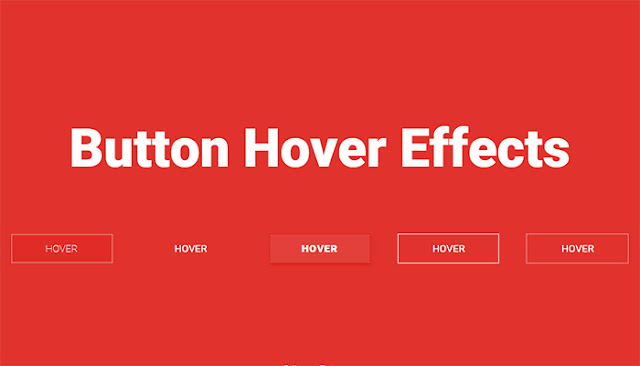
Cách tạo hiệu ứng hover cho button cực đẹp với CSS3
XEM BÀI VIÊT
TOÀN MÀN HÌNH

Demo  

1. Code HTML

Đầu tiên, chúng ta cần có khung chuẩn html như sau:
<section class="buttons">
<div class="container">
<h1>Button Hover Effects</h1>
<a href="https://twitter.com/thecntech" class="btn btn-1">
<svg><rect x="0" y="0" fill="none" width="100%" height="100%"/></svg>
Hover
</a>
<!--End of Button 1 -->
<a href="https://twitter.com/thecntech" class="btn btn-2">Hover</a>
<!--End of Button 2 -->
<a href="https://twitter.com/thecntech" class="btn btn-3">Hover</a>
<!--End of Button 3 -->
<a href="https://twitter.com/thecntech" class="btn btn-4"><span>Hover</span></a>
<!--End of Button 4 -->
<a href="https://twitter.com/thecntech" class="btn btn-5">Hover</a>
<!--End of Button 5 -->
<p>Follow on <a href="http://www.twitter.com/thecntech" target="_blank">Twitter</a></p>
</div>
</section>

2. Code CSS

Và sau đây là toàn bộ đoạn css giúp các bạn tạo được hiệu ứng button:
@import url(http://fonts.googleapis.com/css?family=Roboto:400,100,900);
* {
box-sizing: inherit;
transition-property: all;
transition-duration: .6s;
transition-timing-function: ease;
}
html,
body {
box-sizing: border-box;
height: 100%;
width: 100%;
}
body {
background: #E1332D;
font-family: 'Roboto', sans-serif;
font-weight: 400;
}
.buttons {
display: table;
height: 100%;
width: 100%;
}
.container {
display: table-cell;
padding: 1em;
text-align: center;
vertical-align: middle;
}
h1 {
color: #fff;
font-size: 1.25em;
font-weight: 900;
margin: 0 0 2em;
}
@media (min-width: 450px) {
h1 {
font-size: 1.75em;
}
}
@media (min-width: 760px) {
h1 {
font-size: 3.25em;
}
}
@media (min-width: 900px) {
h1 {
font-size: 5.25em;
margin: 0 0 1em;
}
}
p {
color: #fff;
font-size: 12px;
}
@media (min-width: 600px) {
p {
left: 50%;
position: absolute;
transform: translate(-50%, 0);
top: 90%;
}
}
@media (max-height: 500px) {
p {
left: 0;
position: relative;
top: 0;
transform: translate(0, 0);
}
}
p a {
background: rgba(255, 255, 255, 0);
border-bottom: 1px solid;
color: #fff;
line-height: 1.4;
padding: .25em;
text-decoration: none;
}
p a:hover {
background: white;
color: #E1332D;
}
.btn {
color: #fff;
cursor: pointer;
display: block;
font-size: 16px;
font-weight: 400;
line-height: 45px;
margin: 0 auto 2em;
max-width: 160px;
position: relative;
text-decoration: none;
text-transform: uppercase;
vertical-align: middle;
width: 100%;
}
@media (min-width: 400px) {
.btn {
display: inline-block;
margin-right: 2.5em;
}
.btn:nth-of-type(even) {
margin-right: 0;
}
}
@media (min-width: 600px) {
.btn:nth-of-type(even) {
margin-right: 2.5em;
}
.btn:nth-of-type(5) {
margin-right: 0;
}
}
.btn:hover {
text-decoration: none;
}
.btn-1 {
background: #e02c26;
font-weight: 100;
}
.btn-1 svg {
height: 45px;
left: 0;
position: absolute;
top: 0;
width: 100%;
}
.btn-1 rect {
fill: none;
stroke: #fff;
stroke-width: 1;
stroke-dasharray: 422, 0;
}
.btn-1:hover {
background: rgba(225, 51, 45, 0);
font-weight: 900;
letter-spacing: 1px;
}
.btn-1:hover rect {
stroke-width: 5;
stroke-dasharray: 15, 310;
stroke-dashoffset: 48;
transition: all 1.35s cubic-bezier(0.19, 1, 0.22, 1);
}
.btn-2 {
letter-spacing: 0;
}
.btn-2:hover,
.btn-2:active {
letter-spacing: 5px;
}
.btn-2:after,
.btn-2:before {
backface-visibility: hidden;
border: 1px solid rgba(255, 255, 255, 0);
bottom: 0px;
content: " ";
display: block;
margin: 0 auto;
position: relative;
transition: all 280ms ease-in-out;
width: 0;
}
.btn-2:hover:after,
.btn-2:hover:before {
backface-visibility: hidden;
border-color: #fff;
transition: width 350ms ease-in-out;
width: 70%;
}
.btn-2:hover:before {
bottom: auto;
top: 0;
width: 70%;
}
.btn-3 {
background: #e3403a;
border: 1px solid #da251f;
box-shadow: 0px 2px 0 #d6251f, 2px 4px 6px #e02a24;
font-weight: 900;
letter-spacing: 1px;
transition: all 150ms linear;
}
.btn-3:hover {
background: #e02c26;
border: 1px solid rgba(0, 0, 0, 0.05);
box-shadow: 1px 1px 2px rgba(255, 255, 255, 0.2);
color: #ec817d;
text-decoration: none;
text-shadow: -1px -1px 0 #c2211c;
transition: all 250ms linear;
}
.btn-4 {
border: 1px solid;
overflow: hidden;
position: relative;
}
.btn-4 span {
z-index: 20;
}
.btn-4:after {
background: #fff;
content: "";
height: 155px;
left: -75px;
opacity: .2;
position: absolute;
top: -50px;
transform: rotate(35deg);
transition: all 550ms cubic-bezier(0.19, 1, 0.22, 1);
width: 50px;
z-index: -10;
}
.btn-4:hover:after {
left: 120%;
transition: all 550ms cubic-bezier(0.19, 1, 0.22, 1);
}
.btn-5 {
border: 0 solid;
box-shadow: inset 0 0 20px rgba(255, 255, 255, 0);
outline: 1px solid;
outline-color: rgba(255, 255, 255, 0.5);
outline-offset: 0px;
text-shadow: none;
transition: all 1250ms cubic-bezier(0.19, 1, 0.22, 1);
}

.btn-5:hover {
border: 1px solid;
box-shadow: inset 0 0 20px rgba(255, 255, 255, 0.5), 0 0 20px rgba(255, 255, 255, 0.2);
outline-color: rgba(255, 255, 255, 0);
outline-offset: 15px;
text-shadow: 1px 1px 2px #427388;
}

Thứ Sáu, 11 tháng 12, 2015

noavatar
XEM BÀI VIÊT
TOÀN MÀN HÌNH

Tạo button với hiệu ứng hover đơn giản bằng CSS3

Tranh thủ một chút ít thời gian, mình sẽ chia sẻ cho các bạn một mẫu button rất đáng để các bạn sử dụng trên các trang blog hay web của mình. Nếu không thích thì các bạn cũng có thể học thêm được nhiều về CSS3 với những thuộc tính mà nó tạo hiệu ứng cho button này.
Tạo button với hiệu ứng hover đơn giản bằng CSS3
HTML
Các bạn chỉ cần khung chuẩn html cho button đơn giản như sau :
1
<button>Hover me !</button>
CSS
Và đây chính là trái tim của bài viết, các bạn chỉ cần copy đoạn css sau :
01
02
03
04
05
06
07
08
09
10
11
12
13
14
15
16
17
18
19
20
21
22
23
24
25
26
27
28
29
30
31
32
33
34
35
36
37
38
39
40
41
42
43
44
45
46
47
48
html,body{
  height:100%;
}
body{
  text-align:center;
}
body:before{
  content:'';
  height:100%;
  display:inline-block;
  vertical-align:middle;
}
button{
  background:#1AAB8A;
  color:#fff;
  border:none;
  position:relative;
  height:60px;
  font-size:1.6em;
  padding:0 2em;
  cursor:pointer;
  transition:800ms ease all;
  outline:none;
}
button:hover{
  background:#fff;
  color:#1AAB8A;
}
button:before,button:after{
  content:'';
  position:absolute;
  top:0;
  right:0;
  height:2px;
  width:0;
  background: #1AAB8A;
  transition:400ms ease all;
}
button:after{
  right:inherit;
  top:inherit;
  left:0;
  bottom:0;
}
button:hover:before,button:hover:after{
  width:100%;
  transition:800ms ease all;
}
Không quá khó để các bạn hiểu rõ đoạn css trên phải không ? Mình tin rằng các bạn sẽ có thêm ý tưởng cho những mẫu thiết kế web sau này.
Chúc các bạn thành công !